Understanding Qbee
You've connected a device, applied a configuration, and organized a fleet. You know that Qbee works. This page explains how it works, following a configuration change from the moment you click Commit to the moment the device confirms it has applied it.
The Agent and the Cloud
The agent is a lightweight, open-source Go binary that runs as a system service on each Linux device. When you bootstrap a device, the agent generates a unique key pair that the platform uses to identify and authenticate it on every subsequent connection.
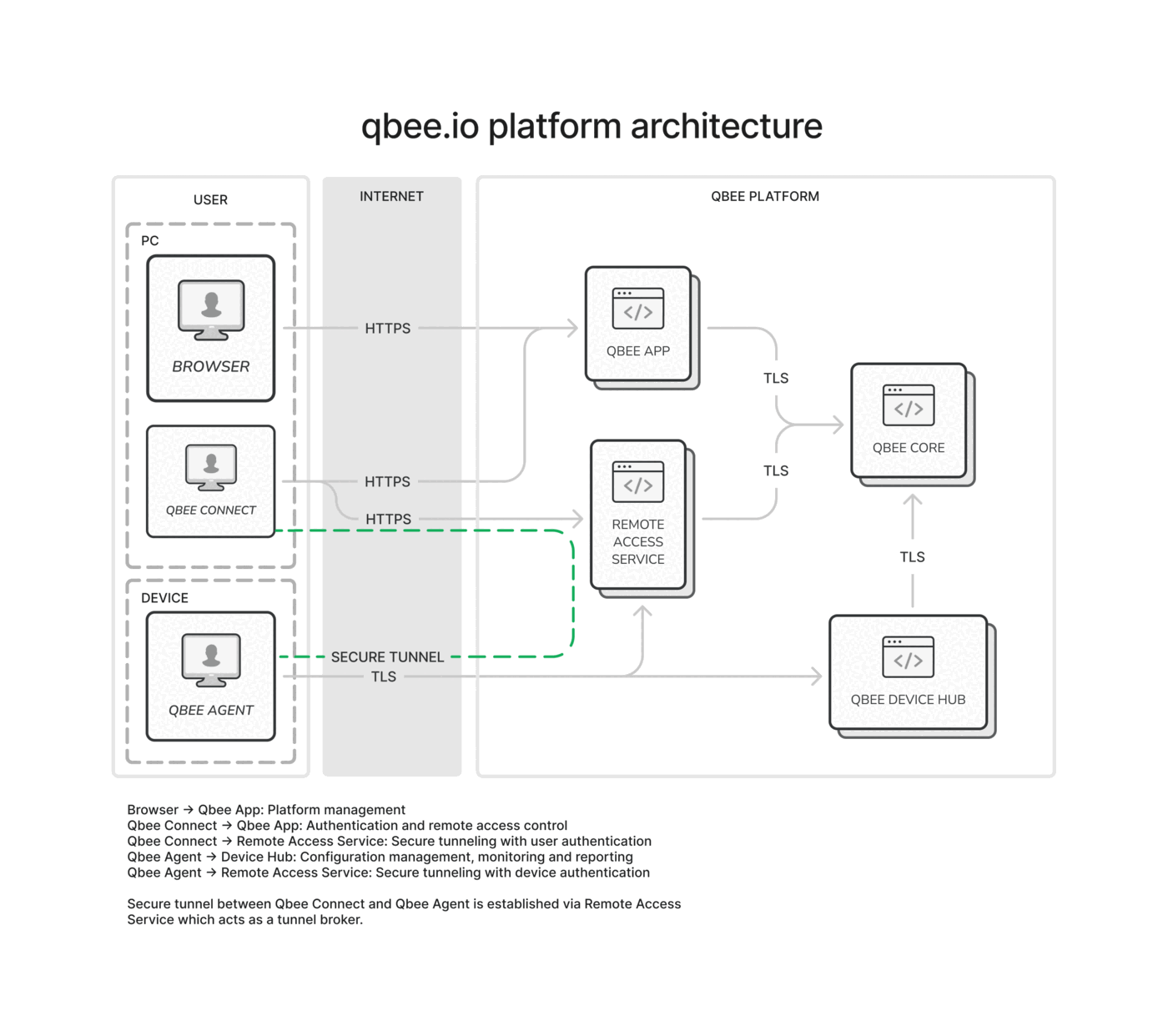
The agent handles two functions. The configuration engine polls the cloud for desired state, converges the device to match, and reports status back. The remote access component establishes a secure tunneled connection to geographically distributed servers, allowing you to reach devices behind firewalls and NAT for terminal access and port forwarding.
The cloud platform is where you manage your fleet. It consists of a backend that stores desired state and processes agent requests, a web console that provides the primary interface for device management, and an API gateway that exposes every operation for automation. All data is encrypted and replicated across at least three geographical locations, with the platform operating from multiple sites for high availability.
All communication between the agent and the platform uses HTTPS (TCP port 443) with mutual TLS, so the device and the platform verify each other on every connection. Built-in proxy support allows the agent to operate in environments where direct internet access is unavailable; see Behind a Proxy? for configuration.
Device authentication
During bootstrap, the agent generates a unique key pair, and the device holds the resulting private key (qbee.key) and X.509 certificate (qbee.cert). On every subsequent connection, the agent presents this certificate to the platform during the TLS handshake, and the platform verifies it. The platform also presents its own certificate to the agent, as in any TLS connection. Because both sides present and verify certificates, the connection is mutually authenticated at the transport layer. This is mutual TLS, or mTLS.
The bootstrap key is a one-time enrollment secret. It establishes the initial trust relationship so the platform will accept the device's new certificate. After enrollment, the bootstrap key is never used again for that device; the device proves its identity with its own certificate on every poll.
The platform supports role-based access control, audit logging of all configuration changes, and agent attestation to verify binary integrity. See Audit Log for change tracking and the TPM and CVE pages for hardware security and vulnerability management.
The Polling Cycle
The agent initiates all communication. At a configurable interval, it connects to the cloud over HTTPS, retrieves its desired configuration, converges the device to match, and reports its current status. This repeats continuously.
flowchart LR
    A[Agent polls server] --> B{State changed?}
    B -->|Yes| C[Converge device]
    C --> D[Report status]
    D --> E[Wait for next interval]
    B -->|No| E
    E --> A

    classDef action fill:#e1f5fe,stroke:#0288d1,color:#01579b
    classDef decision fill:#fff8e1,stroke:#f9a825,color:#f57f17
    classDef wait fill:#f1f8e9,stroke:#689f38,color:#33691e

    class A,C action
    class B decision
    class D,E wait
As part of each poll, the agent also reports device inventory, system metrics (CPU, memory, disk, temperature), and custom metrics to the platform. The web console provides dashboards and alerting based on this data. See Monitoring for details.
This pull-based model is the opposite of push-based management tools, where a control server connects to each device and sends commands. With Qbee, the server never initiates contact with a device. This has several benefits:
- No inbound ports required: the device makes outbound HTTPS connections on port 443, so it can sit behind NAT, mobile networks, and multi-level firewalls.
- No server-side connection state: each poll is an independent HTTPS request. The platform doesn't maintain persistent connections to devices, so adding 10,000 more devices doesn't require managing 10,000 sockets.
- Natural scaling: every agent polls independently on its own schedule. Whether you have 10 devices or 10 million, all receive updates within the same reporting window. Push-based systems build queues under load; pull-based systems do not.
Configuration Convergence
When you commit a configuration in the console, the desired state is stored on the server. Nothing is sent to the device at that moment. On its next poll, the agent downloads the new desired state and converges the device to match, creating users, distributing files, installing packages, or applying any other configuration bundle.
When a change takes an extra polling cycle
A committed change is designed to reach the agent on its next polling cycle. Occasionally, platform-side cache invalidation means the agent does not see the update until the cycle after that. If a committed change has not taken effect after the first poll, wait for the next one before investigating.
The same mechanism handles over-the-air software and firmware updates: the desired package version becomes part of the desired state, and the agent converges on its next poll. See OTA Updates for supported update mechanisms.
The key concept is desired state. The agent doesn't run a script; it converges toward a target. Running the same operations multiple times produces the same result, which matters because the agent re-evaluates the desired state on every poll. If the configuration has already been applied, the operations are no-ops.
The agent stores the desired state locally on the device. If the device goes offline, it retains its last-known configuration. When it reconnects, it polls, receives the current desired state, and converges, even if the device was offline for days or weeks. If something changes on the device outside of Qbee (a user manually edits a file, for example), the agent detects the drift on its next poll and reconverges to the desired state.
When Things Go Wrong
The polling cycle handles most problems gracefully, but it helps to understand what happens in specific failure scenarios:
Device offline during a change. The desired state waits on the server. When the device reconnects, it polls and converges. No action required; there is no "missed message" or timed-out command.
Network drops mid-convergence. The agent stores the desired state locally before beginning convergence. If the network drops, the agent continues applying changes on the device and reports status when connectivity returns. Because operations produce the same result when repeated, partial convergence is not harmful: the next poll completes whatever was interrupted.
Agent fails to apply a change. The agent reports the failure on its next poll. The console shows the device as not converged, and the error appears in the audit log. The agent retries convergence on subsequent polls.
Something changes on the device outside Qbee. The agent detects the drift on its next poll and reconverges to the desired state. This is continuous configuration management, not one-time provisioning.
For step-by-step diagnostic instructions, see the Troubleshooting guide and FAQ.
What Next?
| I want to... | Go to |
|---|---|
| Configure a specific aspect of my devices | Configuration |
| Deploy the agent to multiple devices using a script | Script-Based Deployment |
| Access a device remotely | Remote Access |
| Troubleshoot an issue or read FAQs | Learn More |